
Pilot Academy - The Ultimate Social Automation Guide
Master every aspect of social automation with a complete training system designed for speed, clarity, and real-world execution. Pilot Academy gives you step-by-step tutorials for every platform, every tool, and every workflow inside MP Pilot — from account setup to large-scale growth systems. Whether you're running a single brand or managing hundreds of profiles, you'll learn exactly how to automate safely, scale efficiently, and operate like a pro. This is your blueprint to becoming a top-tier automation operator.
Pilot Academy
The Ultimate Training Library to Master MP Pilot
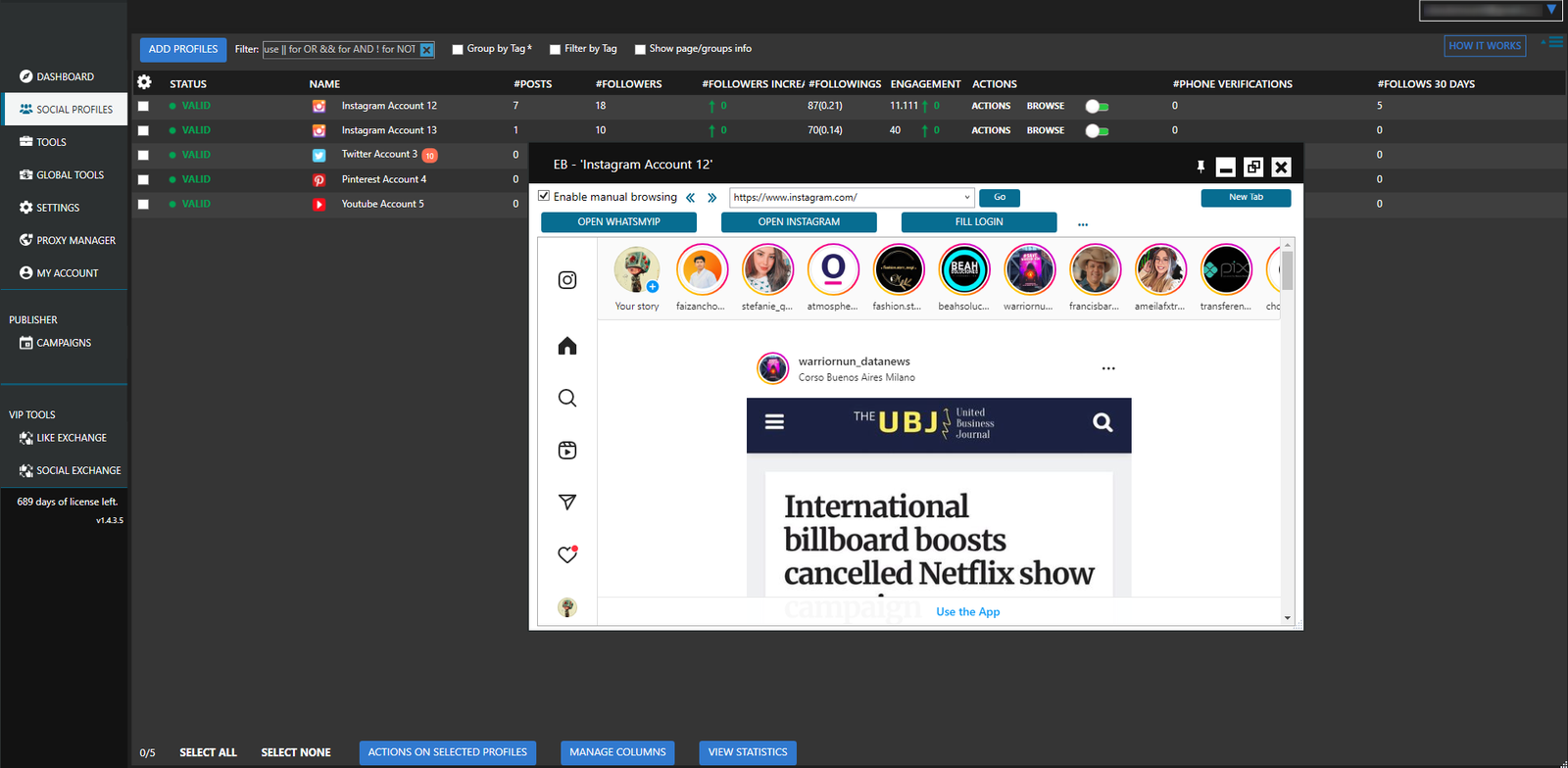
MP Pilot Academy is the official, step-by-step education hub designed to help you fully utilize the power of MP Pilot. Every module is organized, beginner-friendly, and built to guide even advanced automation users with ease. Inside MP Pilot Academy, you will be able to:
Learn the entire system in just hours: Quickly understand the complete workflow through a clean interface, guided presets, and streamlined automation paths. Even advanced multi-account operations become effortless with ready-made templates and a structured onboarding process.
Automate all major social platforms: Handle posting, following, scraping, messaging, warming, and engagement tasks across every supported platform—directly from one unified dashboard. Replace multiple tools with one powerful automation environment.
Scale safely and sustainably: Use smart delays, randomized activity, natural behavior patterns, and safety-focused actions to reduce risk. MP Pilot is optimized for long-term account health, allowing you to grow organically without triggering platform restrictions.
Manage large multi-account systems with confidence: Oversee hundreds of profiles, campaigns, and workflows using detailed controls. Track performance, organize client operations, and run full-scale growth systems from a single, high-efficiency workstation.
Below is the complete breakdown of everything included inside MP Pilot Academy:
Getting Started
This section gives you everything you need to get MP Pilot up and running quickly. From installation and system requirements to adding accounts, basic automations, troubleshooting, and support access — you’ll be fully set up and operating confidently within hours.
- 1How To Download & Install MP Pilot
- 2How To Add Your Accounts To MP Pilot
- 3How To Automate Posting To Your Accounts
- 4Automating Your Account Growth
- 5Attracting More Attention To Your Account
- 6Automatically Adding Content To Your Accounts
- 7MP Pilot Overview
- 8Expanding Your Reach
- 9MP Pilot System Requirements
- 10MP Pilot Error Codes
- 11MP Pilot Get Help
Using Social Profiles
Learn how to manage every aspect of your accounts at scale. MP Pilot shows you how to organize profiles, adjust individual settings, group accounts, manage pages, build ignore lists, and track notes so your entire operation stays clean and efficient.
- 1The Social Profiles Tab
- 2The Account Settings Tab
- 3The Account Groups Tab
- 4The Account Pages Tab
- 5The Account Friends Tab
- 6The Account Ignore Tab
- 7The Account Notes Tab
Lorem ipsum dolor sit amet, consectetur adipisicing elit, sed do eiusmod tempor incididunt ut labore et nam dolore magna aliqua. Ut enim ad minim veniam, quis nostrud exercitation ullamco nam laboris nisi ut aliquip ex ea commodo consequat. Duis aute irure dolor in reprehenderit in adec voluptate velit esse cillum dolore eu fugiat nulla pariatur.
MP Pilot Dashboard
A complete walkthrough of the main dashboard
where you monitor system activity, review statistics, read updates, manage notifications, and reach support. This is your central hub for tracking performance and staying on top of all automation tasks.
- 1The Summary Tab
- 2The Statistics Tab
- 3The What’s New Tab
- 4The Contact Support Tab
- 5The Notifications Tab
Instagram Automation Tutorials
MP Pilot equips you with every tool needed to grow, manage, and scale Instagram profiles safely.
You get detailed guidance on follow/unfollow cycles, repost workflows, Story viewing strategies, hashtag/user scraping, mentions automation, highlight management, and Reel interactions.
- The Instagram Follow Tool
- The Instagram Follow Back Tool
- The Instagram Unfollow tool
- The Instagram Like Tool
- The Instagram Comment tool
- The Instagram Contact tool
- The Instagram Direct Messages Tool
- The Instagram Manage Comments Tool
- The Instagram Delete Posts Tool
- The Instagram Delete Comments Tool
- The Instagram Block Followers Tool
- The Instagram Repost tool
- The Instagram Users and Hashtags Tool
- The Instagram Like Comments Tool
- The Instagram Save Posts Tool
- The Instagram Story Viewer Tool
- The Instagram Mute Users tool
- The Instagram Random Actions Tool
- The Instagram Mentions tool
- The Instagram Edit Profile Tab
- The Instagram Scrape Tools
- Instagram – Two Factor Authentication
- Instagram – Automatic Email Verification
- Instagram – How To Use Second Level Tagging
- Instagram – Tagname Scraping Method
- How Sending Secondary Messages Work?
- The Instagram Like Exchange Tool
- Using API Limits and Delays for Instagram
- Generating app passwords for Email Verification
- How To Use AI To Comment On Instagram Posts
- How to Fix "Instagram is Always Initializing"
- How the Contextual Actions function works (Instagram)
- How To Import Instagram Accounts Using API Cookies
- Solving Instagram 2FA using a Secret Key
- How To Create Instagram Highlights & Add Stories To Your Highlights
- How to Automatically Solve Captcha?
- Confirming your Instagram account email
- The Full Browser Experience
- The Instagram Reel Viewer Tool
- Unavailable IG tools when Using Only EB
- Using AI Content Comments for MP Pilot
Facebook Automation Tutorials
Become a Facebook automation expert with step-by-step instructions covering group joiner/unjoiner, member finder, contact tools, Marketplace renewals, friend management, post deletion, support inbox handling, and engagement exchange systems.
MP Pilot teaches you how to scale multiple profiles safely, build active communities, and automate daily interactions without triggering restrictions.
- The Facebook Finder Tool
- The Facebook Joiner Tool
- The Facebook Unjoiner Tool
- The Facebook Notifications Off Tool
- The Facebook Account Actions Tool
- The Facebook Accept Members Tool
- The Invite Friends Tool
- How To Use The Facebook Contact Tool In SuSocial
- The Friends Backup Tool
- The Facebook Bump Tool
- The Facebook Delete Posts Tool
- The Facebook Cover Photo Tool
- The Facebook Birthday Tool
- The Facebook Unfriend Tool
- The Facebook Like Comments Tool
- The Facebook Support Inbox Tool
- The Facebook Search and Add Friends Tool
- The Facebook Delete Comments Tools
- The Facebook Accept Group Invites Tool
- The Facebook Marketplace Renew Tool
- The Facebook Reply Comments Tool
- The Social Exchange Tool
- How Sending Secondary Messages Work?
- Actions you can do as a Facebook Page
- Unjoining specific groups on Facebook
- All Facebook Friends Are Not Synced
- The Facebook Remove Non Interactive Friends Tool
- The Facebook Comment & Like Tool
- The Full Browser Experience
- Using AI Content Comments for MP Pilot
LinkedIn Automation Tutorials
MP Pilot includes a full corporate-grade automation suite for LinkedIn: profile viewer, connector tool, search & connect, search & contact, email scraping, company page scraping, endorsements, events interaction, and message sequences.
You learn exactly how to run multi-profile outreach safely while maintaining high deliverability and avoiding network limits.
- The LinkedIn Finder Tool
- The LinkedIn Joiner Tool
- The LinkedIn Unjoiner Tool
- The LinkedIn Follow Tool
- The Linkedin Unfollow Tool
- The Linkedin Like Tool
- The Linkedin Comment Tool
- The Linkedin Invite Tool
- The Linkedin Contact Tool
- The Linkedin Birthday Tool
- The Linkedin Unfriend Tool
- The LinkedIn Like Comments Tool
- The Linkedin Endorse Connections Tool
- The Linkedin Accept Connection Requests Tool
- The Linkedin Profile Viewer Tool
- The Linkedin Connector Tool
- The Linkedin Search and Connect Tool
- The Linkedin Search and Contact Tool
- The Linkedin Extract Emails Tool
- The Linkedin Profile Scraper Tool
- The LinkedIn Like As Page Tool
- The LinkedIn Cancel Connection Requests Tool
- The Linkedin Events Tool
- The LinkedIn Two Factor Authentication Tab
- The Social Exchange Tool
- The LinkedIn Share Posts Tool
- The LinkedIn Comment As Page Tool
- The LinkedIn Company Pages Scraper Tool
- The LinkedIn Contact By Tags Tool
- Unjoining specific groups on LinkedIn
- All LinkedIn Friends Are Not Synced
- Linkedin : How To Send Messages To New Connections
- The Full Browser Experience
- Using AI Content Comments for MP Pilot
Twitter Automation Tutorials
You get complete guidance on follow, unfollow, likes, retweets, replies, mentions, post deletion, and contact tools — all optimized for the platform’s newest rules.
MP Pilot tutorials show you how to build engagement loops, automate replies, and use advanced search operators to target users with precision.
- The Twitter Follow Tool
- The Twitter Follow Back Tool
- The Twitter Unfollow Tool
- The Twitter Like Tool
- The Twitter Retweet And Reply Tool
- The Twitter Mention Tool
- The Twitter Delete Posts Tool
- The Twitter Email Validation Tab
- Twitter Advanced Search Operators
- The Social Exchange Tool
- How Sending Secondary Messages Work?
- The Full Browser Experience
- The Twitter Contact Tool
- Using AI Content Comments for MP Pilot
Pinterest Automation Tutorials
MP Pilot walks you through Pinterest automation: follow/unfollow, repin campaigns, comment tools, contact tools, and automated board creation.
Perfect for ecom, bloggers, and niche marketers who want to distribute content at scale while keeping accounts fully trusted.
- The Pinterest Follow Tool
- The Pinterest Follow Back Tool
- The Pinterest Unfollow Tool
- The Pinterest Comment Tool
- The Pinterest Repin Tool
- The Pinterest Contact Tool
- The Pinterest Create Boards Tool
- The Social Exchange Tool
- The Full Browser Experience
- Using AI Content Comments for MP Pilot
Quora Automation Tutorials
Build influence automatically with tools for following, unfollowing, upvoting, answering, and comment engagement.
MP Pilot shows you how to run consistent activity, warm up accounts, and position yourself as a trusted writer in any niche.
- The Quora Follow Tool
- The Quora Unfollow Tool
- The Quora Upvote Tool
- The Quora Answers Tool
- The Social Exchange Tool
- The Full Browser Experience
- Using AI Content Comments for MP Pilot
Reddit Automation Tutorials
Master Reddit with tutorials covering comment automation, post upvotes, comment upvotes, full browser browsing patterns, and safe interaction setups.
MP Pilot teaches you how to blend into communities naturally, avoid footprint issues, and grow traffic without triggering spam filters.
- The Reddit Comment Tool
- The Reddit Upvote Tool
- The Reddit Upvote Comments Tool
- The Full Browser Experience
- Using AI Content Comments for MP Pilot
Youtube Automation Tutorials
Learn how to automate likes, comments, replies, watching behavior, subscribe/unsubscribe actions, and repost workflows.
MP Pilot also includes fixes for sign-in issues, EB login methods, Shorts/Reels handling, and safe watch-time automation.
- The Youtube Follow Tool
- The Youtube Unfollow Tool
- The Youtube Like Tool
- The Youtube Comment Tool
- The Youtube Like and Reply Comments Tool
- The Youtube Watch Videos Tool
- The Social Exchange Tool
- How to fix "Couldn't sign you in" for YouTube
- The Youtube Repost tool
- The Full Browser Experience
- Using AI Content Comments for MP Pilot
Tumblr Automation Tutorials
Automate Tumblr growth with follow/unfollow systems, reblog sequences, like automation, contact tools, and engagement exchange.
MP Pilot guides you on how to keep accounts warmed up and distribute niche content efficiently.
- The Tumblr Follow tool
- The Tumblr Unfollow tool
- The Tumblr Like tool
- The Tumblr Reblog tool
- The Tumblr Contact tool
- The Social Exchange Tool
- The Full Browser Experience
Settings
Optimize MP Pilot for maximum stability and performance. This section explains software settings, embedded browsers, platform configurations, connectivity rules, notifications, security options, and backup systems that keep your automations running smoothly.
Global Tools
Explore MP Pilot’s bulk-automation arsenal: global DMs, story viewers, comment managers, engagement groups, bulk editors, mass scraping, and account creation tools. These features let you automate actions across hundreds of accounts simultaneously.
Using Campaigns
Master the most powerful posting engine in the automation market. Learn how to run scheduled, volume, and smart campaigns; use AI content; scrape posts; pull from RSS
feeds; publish clickable images; and build high-volume content systems that run 24/7.
- The Campaigns View Tab
- The Standard Campaigns
- The Volume Campaigns
- The Scheduled Campaigns
- Campaigns – The Overview tab
- Campaigns – The What To Publish tab
- Campaigns – The Where To Publish tab
- Campaigns – The When To Publish tab
- Campaigns – The Drafts tab
- Campaigns – The Posts List tab
- Campaigns – The History tab
- Creating Posts Using AI Content Generator
- Campaigns – The Scrape Posts
- Campaigns – The RSS Posts Extractor
- Setting Up SuSocial To Monitor A Folder
- Campaigns – The Clickable Image Posts
- Campaigns – The Share Posts
- Campaigns – The Flickr Posts Extractor
- The Campaigns Tokens Explained
Extra Resources
Advanced guides for power users, covering everything from VPS migration, API keys, marketplace automation, cookies, CSV imports, scraper optimization, captcha solving, and full login recovery methods for major platforms. Ideal for scaling serious operations.
- How To Use The Proxy Manager
- The Tools View Tab
- Creating Posts Using AI Content Generator
- How To Access Your VPS From An Android Device
- How To Move MP Pilot to another Computer/VPS
- MP Pilot License Limit Reached
- How Can I Upgrade To The Next Higher Plan?
- Do You Have Any Other Higher Plans?
- Local Data Is Locked For ’email’ Error
- How to publish a post to your blogs via MP Pilot
- One year free Windows VPS for MP Pilot – Full Guide
- How To Access Your VPS From An iOS Device
- How Can I Change My Password?
- The Computer That You Are Using Is Blacklisted
- I Want To Change My MP PILOT Account Email
- Multilogin Tool
- Generating app passwords for Email Verification
- Actions you can do as a Facebook Page
- How the Contextual Actions function works (Instagram)
- How to send emails using MP Pilot
- How To Enable External App Password For Mail.ru (BK.ru, index.ru, List.ru)
- Creating Clickable Image Posts in MP Pilot
- Yahoo 2-Step Verification
- Rediffmail 2-Factor Authentication
- Google 2-Step Verification
- How To Import Instagram Accounts Using API Cookies
- All Facebook Friends Are Not Synced
- All LinkedIn Friends Are Not Synced
- Mail.ru 2-Factor Authentication
- How To Generate API Keys for the Connectivity tab
- How To Post To Stories Via MP Pilot
- How To Create A Spin Syntax Text
- Keep Your Scrapers Running Forever: A Beginner's Guide
- Publishing Instagram Reels with MP Pilot: A Step-by-Step Guide
- Importing Cookies to MP Pilot
- How To Add Posts In Bulk Using A CSV File To Your Campaign In MP Pilot
- How To Add and Publish Sell Posts To Facebook Marketplace & Sell Groups
- How to profile my accounts?
- Troubleshooting issues using the Summary tab
- How To Use COPY SETTINGS and GLOBAL COPY SETTINGS In MP Pilot Tools
- How to Automatically Solve Captcha?
- Confirming your Instagram account email
- How to Publish A Video To Facebook Reels Using MP Pilot
- Unavailable IG tools when Using Only EB
- Using AI Content Comments for MP Pilot
PILOT academy
Pilot Academy - Pricing
$7
(one-time payment)
Learn everything you need to understand social media automation before committing to MP Pilot.
What you get:
It helps you understand:
So you can make a confident, informed decision before subscribing.
We accept payments via Crypto, PayPal, Credit Card, and Visa.

Message us at @socialautokit with your transaction ID or payment email for instant activation.
Fastest support via Telegram - replies within minutes!
Refund Policy
Pilot Academy is a low-cost educational product — no refunds are offered. If you're unsure about automation or MP Pilot, the Academy is the safest first step before purchasing the full software.
Pilot Academy - FAQ
Pilot Academy is a step-by-step training program that teaches you how social media automation works. It shows you real workflows, targeting strategies, safe practices, and expected results — so you can decide for yourself if MP Pilot is right for you.
Access to the full Academy is only $5 (one-time payment). No recurring fees.
No - the Academy is fully educational. You can complete all lessons and understand automation concepts before purchasing MP Pilot, helping you make an informed decision.
No refunds are offered. The Academy is low-cost and designed to let you see the value of automation before buying the software.
Social media automation workflows for Instagram, Facebook, X/Twitter, Pinterest, LinkedIn, Reddit, YouTube, and more
Safe automation practices, including proxies, limits, and account protection
Targeting real and engaged users
How to interpret results and analytics
Step-by-step guides to simulate campaigns manually before automation
We accept Crypto, PayPal, Credit Card, and Visa.
Once payment is completed, you’ll receive immediate access to the Academy content. Instructions are sent via email or payment confirmation page.
Yes, it’s fully online. You can access it from any device with a web browser.
Beginners curious about social media automation
Marketers, agencies, or teams evaluating automation tools
Anyone who wants to understand MP Pilot’s value before subscribing